Amazon Negative Keyword Automation Explained
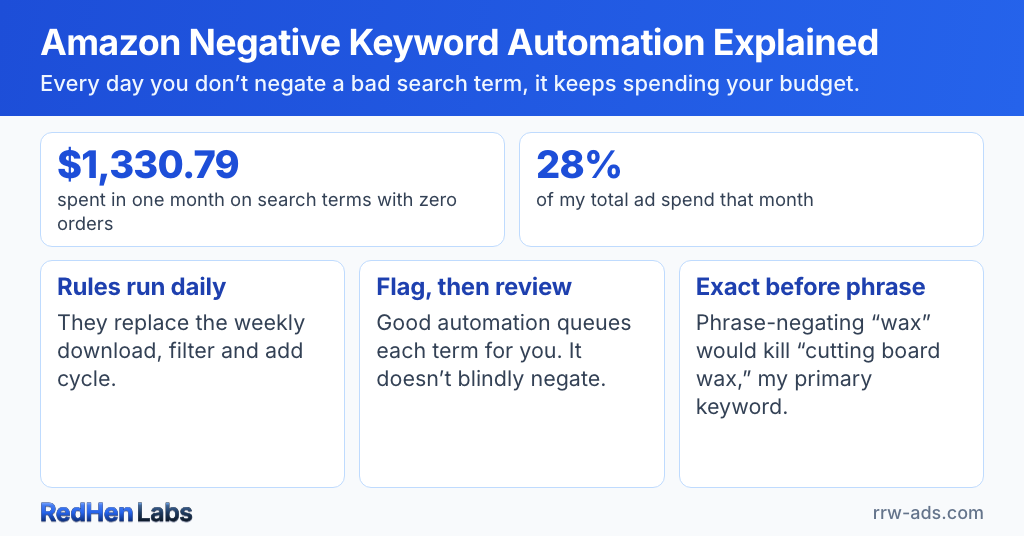
Last month my Rowdy Rooster Woodworks ad account spent $1,330.79 on search terms that didn't produce a single order. That's 28% of my total spend, gone to clicks from shoppers who didn't convert. Whether 28% sounds high or low isn't the point — the point is that until I see the report, that money is bleeding daily, and I'm paying for the same irrelevance over and over.
The daily bleed
Take "wood oil." Eighteen clicks over the last three weeks. $25 spent. Zero orders. Someone looking for wood-finishing oil isn't my customer — I sell cutting board wax — but the broad-match algorithm couldn't tell the difference. Multiply that by the dozens of similar terms accumulating in my search term reports each week and the gap between "I should negate that" and "I actually negated it" becomes the most expensive habit in PPC.
The short version
- Last month the Rowdy Rooster Woodworks ad account spent $1,330.79 on search terms that produced no orders — 28% of total spend.
- One example: the term "wood oil" took eighteen clicks and $25 over three weeks with zero orders, because broad match could not tell wood-finishing oil from the cutting board wax actually being sold.
- This is how Amazon discovers traffic rather than a fault: auto campaigns and broad match cast a wide net, and the job is to negate the misses before they compound.
- Negative keyword automation replaces the weekly download-filter-add cycle with rules that run daily, such as flagging any term that spends more than a set amount over a set window with zero orders.
- Good automation flags candidates for review rather than negating them outright, because a zero-order term with a high add-to-cart rate usually means the listing needs work, not the keyword.
This isn't broken. It's how Amazon discovers traffic. Auto campaigns and broad-match keywords cast a wide net — that's the point. Some of what comes back converts; most doesn't. The job isn't to prevent the discovery, it's to consistently negate the misses before they compound.
What automation actually does
Automated negative-keyword management replaces the weekly download-filter-add cycle with rules that run daily. A rule might say: if a search term has spent more than $X over the last Y days with zero orders, flag it. The thresholds matter and depend on your product — a $300 cutting board needs different rules than a $5 sticker pack. You set them once and the system runs them every day. Nothing slips.
The key word is "flag." Good automation doesn't blindly negate — it queues each candidate for your review. Context isn't always visible in the data alone. A zero-order term with high add-to-cart rate often means the listing needs work, not the keyword.
The nuance that matters
Phrase-match vs exact-match negation is where most people self-inflict. If I phrase-negate "wax" because some search containing "wax" wasn't converting, I just killed every variation — including "cutting board wax," which is my product's primary keyword. Exact negation blocks only the literal string. Phrase negation blocks anything containing it. Get this wrong and you'll watch your own real keywords go dark wondering what happened.
Campaign-level negatives apply to every ad group inside that campaign. Ad-group-level negatives apply only to the specific ad group. Wrong level either solves nothing or blocks good traffic elsewhere.
How RedHen Labs handles it
The system runs your negation rules on a daily schedule. Terms that hit your thresholds get surfaced in a review queue with full context — clicks, spend, campaign, ad group, match type. You choose exact or phrase, campaign-level or ad-group-level. Every action gets logged in an audit trail so you can undo anything with one click.
Yes, I'm pointing at the tool I built. I built it because the manual process is what cost me $1,330 last month before I tightened my own rules.
Combined with keyword harvesting, this creates a continuous loop: auto campaigns discover, winners get promoted to exact, losers get negated, and the cycle tightens every week.
Stop paying for irrelevance. See how the rules work — or check the FAQ for common questions about automation thresholds.
Related reading
Do it step by step in RedHen Labs
Frequently asked questions
What is Amazon negative keyword automation?
Amazon negative keyword automation is a set of rules that run daily to find search terms wasting ad spend, replacing the manual weekly cycle of downloading the search term report, filtering it and adding negatives by hand. A rule might flag any term that has spent more than a set amount over a set window with zero orders. The thresholds depend on the product — a $300 cutting board needs different rules than a $5 sticker pack — and are set once.
How much Amazon ad spend goes to search terms that never convert?
On the Rowdy Rooster Woodworks account it was $1,330.79 in a single month, which was 28% of total ad spend, all on search terms that produced no orders. Whether 28% reads as high or low is not the point: until the report is pulled, that money bleeds daily and the same irrelevant clicks are paid for repeatedly. A single term, "wood oil", accounted for eighteen clicks and $25 over three weeks.
Should negative keyword automation negate terms automatically?
No — good automation flags each candidate for review rather than negating it outright. Context is not always visible in the data alone. A search term with zero orders but a high add-to-cart rate usually means the listing needs work rather than that the keyword is wrong, and negating it removes traffic that was converting further down the page. The rules find the candidates; a person decides.
Ready to automate the right way?
RedHen Labs combines rules with AI — and keeps you in control.