How to Set Up Amazon PPC Automation Rules (Without Losing Control)
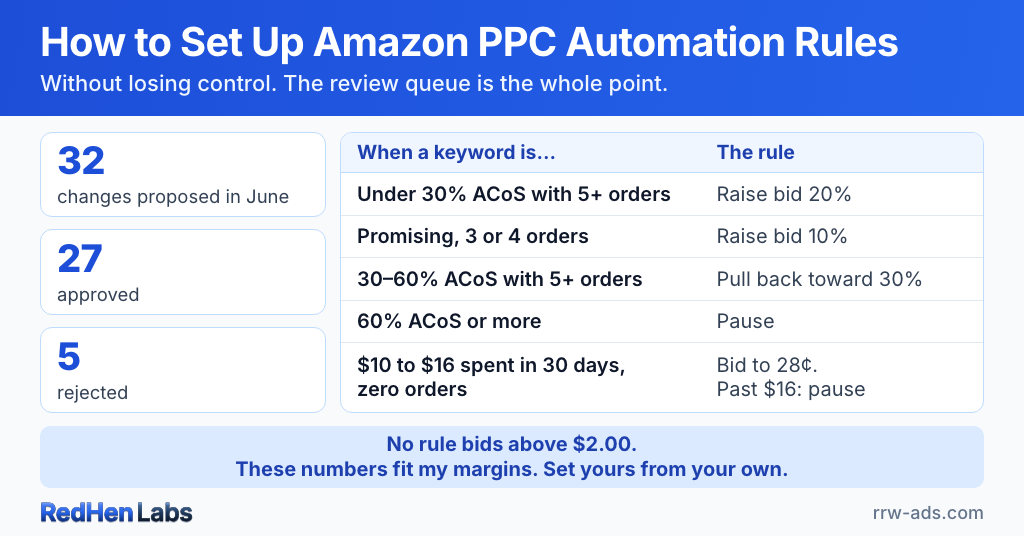
I built this rule-based Amazon ads automation on my own account. Rowdy Rooster Woodworks sells wood-finishing products — cutting board oils, hardwax oil, furniture waxes — and in June my rules proposed 32 changes across my campaigns. I approved 27 of them and rejected 5. The five I rejected are the reason I'll never hand my bids to a system that changes them without asking me first.
So if your instinct when you hear "automate your Amazon bids" is to recoil, that's a healthy instinct. The horror stories are real — sellers who flipped automation on and woke up to blown budgets and jacked-up bids. But the problem in those stories is never automation itself. It's the wrong kind of automation: running without guardrails, and without a human in the loop.
The short version
- Amazon PPC automation rules are conditions and actions you define yourself, so the system proposes changes and waits for your approval rather than acting on hidden logic.
- In June 2026 these rules proposed 32 changes on the Rowdy Rooster Woodworks account: 27 were approved and 5 were rejected.
- Five rules are enough to start — reduce bids on keywords running hot, raise bids on strong converters, negate search terms that take clicks without orders, pause keywords Amazon barely shows, and harvest converting search terms into their own campaigns.
- The difference between rule-based automation and black-box AI is accountability: with rules, every change can be explained and traced to the condition that triggered it.
- My full set is 14 rules, published here with every threshold: under 30% ACoS gets a raise, 30% to 60% gets pulled back toward 30%, 60% or more is paused, and no rule bids above $2.00.
Black-box AI vs rule-based automation
Black-box AI takes control of your bids and changes them based on internal logic you can't see. You hand it a target ACoS and it does whatever it decides to hit that number. Sometimes that works. Sometimes it bids $4.00 on a keyword you'd never have paid that much for, burns your daily budget by noon, and reports it as "optimization" — and you can't see why it made the call, because the reasoning is hidden.
Rule-based automation works the other way around. You define the conditions and the actions. The system checks your rules on a schedule, proposes the changes that match, and then waits. You review them, approve or reject, and only then does anything happen.
The difference is accountability. With rule-based automation I can explain every change and exactly why it was made. With a black box, you usually can't.
Rule-based Amazon ads automation: the rules I built on my own account
The starter version is five rules, and it's genuinely where everyone should begin: reduce bids on keywords running hot, raise bids on strong converters, negate search terms that get clicks but never orders, pause the keywords Amazon barely shows, and harvest converting search terms into their own campaigns. Before you turn on a single one, it's worth a quick audit of what you're already running so you automate the right things. If you're just getting started, those five are enough. They're the foundation, and you shouldn't add a sixth until they're running clean. My own account has evolved far beyond them — and here's what those five turn into after months of tuning.
Mine aren't five switches — they're a tiered system that treats a proven winner, a promising-but-unproven keyword, and a money-loser completely differently:
- Scale what's proven. A keyword under 30% ACoS, converting more than 12% of its clicks, with at least 5 orders behind it, gets its bid raised 20%. The ones with only 3 or 4 orders — promising, not yet proven — get 10%. Winners get room; maybes get a nudge.
- Rein in what's hot but proven. A keyword running between 30% and 60% ACoS with 5 or more orders behind it doesn't get killed. It gets pulled back toward my 30% target, recalculated from what it's actually earning.
- Reset what's hot and unproven. Same high ACoS, but fewer than 5 orders behind it — the bid drops back to what its clicks have actually cost, instead of me guessing high on a keyword that hasn't earned it.
- Cut the bleeders on a rising scale. Ten dollars of spend in 30 days with zero orders and the bid gets throttled to 28 cents. Sixteen dollars with still nothing to show and it gets paused outright. The more money a keyword wastes, the harder the rule comes down.
No rule in the set can bid above $2.00. The AI can recommend changes, but it's on a leash — and I'm holding it. No rule, no matter what it thinks it sees, gets to bid me into a war I can't win on the math.
One caveat before you copy any of this: these numbers fit my business because I know my margins. The 30% target, the $2.00 ceiling, the $16 kill line — those are mine. Yours will almost certainly be different. The structure transfers; the exact numbers don't.
All 14 rules, copy-ready
Here's the whole set, threshold by threshold. In RedHen it's the A’s Set template: load it in one click on the Professional plan, then change the numbers to fit your margins. Negating and harvesting search terms run as their own automations, so they aren't in this table.
| # | Rule | When all of these are true | Then | Looks back |
|---|---|---|---|---|
| 1 | Top Performers | ACoS under 30%, conversion rate over 12%, CTR over 0.4%, 5+ orders | Raise bid 20%, up to $2.00 | 14 days |
| 2 | Mid Performers | ACoS under 30%, conversion rate over 8%, CTR over 0.25%, 3–4 orders | Raise bid 10%, up to $2.00 | 14 days |
| 3 | High ACoS But Selling Well | ACoS 30% to under 60%, 5+ orders | Bid = CPC × (30% ÷ ACoS), kept between $0.50 and $2.00 | 14 days |
| 4 | High ACoS Few Sales | ACoS 30% to under 60%, under 5 orders | Bid = average CPC, kept between $0.50 and $2.00 | 14 days |
| 5 | Very High ACoS | ACoS 60% or more, 1+ order | Pause | 14 days |
| 6 | No Engagement Wake-Up | Under 500 impressions, no orders, no clicks | Raise bid 5%, up to $2.00 | 14 days |
| 7 | Low Conversions Mild Waste | Spend over $10, up to $16, no orders | Set bid to $0.28 | 30 days |
| 8 | Zero Sales High Spend | Spend over $16, no orders | Pause | 30 days |
| 9 | Low CTR & CVR With Traffic | CTR under 0.5%, conversion rate under 8%, 10+ clicks | Set bid to $0.26 | 30 days |
| 10 | Safety Net Catch-All | Spend over $15, conversion rate under 10%, ACoS 25% or more | Set bid to $0.30 | 14 days |
| 11 | Mid-Spend Low-CVR Leak | ACoS 30% to under 60%, conversion rate under 8%, 3–4 orders, spend over $10 | Lower bid 15%, kept between $0.50 and $2.00 | 14 days |
| 12 | High Impressions Zero Clicks | 500+ impressions, no clicks, no orders | Set bid to $0.28 | 14 days |
| 13 | CTR-Only Hygiene | 1,500+ impressions, CTR under 0.25%, no orders | Set bid to $0.28 | 14 days |
| 14 | Gradual Reintroduction of Low-Bid Targets | Bid at $0.29, 1+ click | Raise bid 10%, up to $0.45 | 14 days |
The lookback window is about volume, not the calendar
New sellers agonize over the right ACoS threshold — 30%? 35%? 40%? — and overlook the setting that matters more: how far back the rule looks. And the lookback isn't a number you copy off a blog. It's a question of scale and volume. The longer you look back, the more data piles up, and the more likely any condition becomes true — so a loose rule on a long window will fire constantly on noise.
What you're really doing is waiting until enough has happened to trust the signal. A converting keyword builds that evidence fast, so my scaling rules look back 14 days. The spend rules look back 30, because a slow keyword needs longer before I touch it. Amazon's own 7-to-14-day attribution lag is why you never act on three days of data — a click today might not convert until next week.
But some signals don't need a month. If a keyword has spent $16 and returned zero orders, that's a problem whether you saw it over 14 days or 30. Once real money has gone in with nothing coming out, the spend is the signal — the window just has to be long enough to reach it. Match the lookback to how much volume the keyword actually throws off, not to a number someone told you was safe.
Placement is a rule too
A placement multiplier is just another bid. If you're already automating bids, there's no reason you can't automate your Top of Search adjustments too — and almost nobody does. The same review-and-approve loop tunes placement on my account: when one of my cutting-board campaigns converts under 30% ACoS, the system nudges its Top of Search share up a couple of points; when a campaign runs hot, it eases that share back down. Small, constant, reversible adjustments I'd never keep up with by hand. I go deeper in how I bid for Top of Search — the point here is that placement belongs in the same rules-and-approval system as everything else.
Amazon’s built-in rules vs a rules engine
Amazon has rules of its own, and they're worth knowing before you pay anyone for this. Its console has budget rules: raise a Sponsored Products campaign's budget for a shopping event or a date range, or when the campaign's ACoS, click-through rate or conversion rate over the previous 7 days meets a threshold you set. It has bid rules that raise a campaign's bids at set times of day, days of the week or dates, and rule-based bidding, which adjusts bids to hold a ROAS guardrail you choose. And its Ads Agent, rolling out to eligible advertisers, suggests keyword, bid and budget changes that you review and approve before they apply.
Where they stop is the level they work at. Amazon's budget and bid rules act on a whole campaign, and the ones it documents for Sponsored Products only raise budgets or bids. Rule-based bidding moves bids to hold your ROAS, but how it gets there is Amazon's call. Ads Agent's suggestions come from Amazon's AI, not from conditions you wrote. None of Amazon's pages describe a rule you write for a single keyword (spent $16 in 30 days without an order, so pause it), a ceiling no rule can bid past, or rules that negate and harvest search terms. That's what a rules engine is for: your conditions, keyword by keyword, inside the floor and ceiling you set.
Amazon's features as its own pages describe them, checked November 7, 2026: its budget rules guide, its budget rules (2021) and schedule-based bid rules (2023) announcements, and its Ads Agent pages.
The approval step — and the five changes I rejected
The most important part of any automation system isn't the rules. It's the queue where you approve or reject what they propose. Here's the clearest example I have of why.
On the first of the month, my rules flagged two search terms to negate for running over my ACoS ceiling: "oil for cutting board" at 51% ACoS on 3 orders, and "cutting board conditioner" at 45.7% on 7. A system that executes rules without review might have negated both overnight, and I'd never have known. I rejected both.
Because those aren't wasted spend — they're the exact words that describe what I sell. A high ACoS on a core, category-defining term isn't a leak; it's the cost of defending the search that is your product. It's the same reason you'd never let a rule negate your own brand name. Any rule that cuts everything above a threshold will, sooner or later, come for the keywords you most need to own — and only a person looking at the term knows the difference.
That's the whole case for the review step. The rule is right most of the time — I approved 27 of June's 32 changes. It's the handful of exceptions that would quietly wreck an account, and no threshold catches those. A five-minute review does.
Tools that skip that step — that change bids and log it after the fact — are the ones that produce the horror stories. If you can't review before execution, you don't have automation. You have a bot with your credit card.
The goal of automation isn't to remove you from the loop. It's to make the loop faster.
RedHen Labs runs your rules on your schedule and proposes changes to a review queue, so no bid moves without your approval unless you deliberately switch that automation to run unattended. Every change is logged with a one-click undo. Your rules, your thresholds, your approval — at $129/mo flat, not a percentage of your spend. Start your free 14-day trial.
Related reading
Do it step by step in RedHen Labs
Frequently asked questions
What are Amazon PPC automation rules?
Amazon PPC automation rules are conditions and actions an advertiser defines to manage bids and search terms automatically. A rule pairs a condition with an action, the system checks those rules on a schedule, proposes the changes that match, and then waits. The advertiser approves or rejects each one before anything reaches Amazon. The distinction that matters is not automated versus manual — it is whether the logic is yours and visible, or the tool's and hidden.
How many Amazon PPC automation rules should I start with?
Five rules are enough to start, and they should be running cleanly before a sixth is added. Those five are: reduce bids on keywords running hot, raise bids on strong converters, negate search terms that take clicks but never order, pause the keywords Amazon barely shows, and harvest converting search terms into their own campaigns. They are the foundation; a mature account grows into a tiered system, but it starts here.
What is the difference between rule-based automation and black-box AI for Amazon PPC?
Rule-based automation applies conditions the advertiser wrote, while black-box AI changes bids using internal logic the advertiser cannot see. Given a target ACoS, a black box does whatever it decides will hit that number — which can mean bidding $4.00 on a keyword you would never have paid that for, spending the daily budget by noon, and reporting it as optimization. With rules, every change can be explained and traced back to the condition that triggered it.
Should Amazon PPC automation change bids without my approval?
On the Rowdy Rooster Woodworks account, automation proposes changes and a human approves them. In June 2026 the rules proposed 32 changes; 27 were approved and 5 were rejected. Those five rejections are the reason the review queue exists — a system that executes without asking would have applied all 32.
Does Amazon have its own PPC automation rules?
Yes. Amazon's console has budget rules that raise a Sponsored Products campaign's budget for a shopping event, a date range, or when its ACoS, click-through rate or conversion rate over the previous 7 days meets a threshold; bid rules that raise a campaign's bids at set times; and rule-based bidding, which adjusts bids to hold a ROAS guardrail you choose. Its Ads Agent suggests keyword, bid and budget changes you approve before they apply. None of Amazon's pages describe a rule you write for a single keyword, a bid ceiling across rules, or rules that negate and harvest search terms (checked November 7, 2026).
What thresholds do your Amazon PPC automation rules use?
Mine raise bids 20% on keywords under 30% ACoS with at least 5 orders, pull keywords between 30% and 60% ACoS back toward a 30% target, pause anything at 60% ACoS or more, drop a keyword that spends $10 to $16 in 30 days without an order to a $0.28 bid, and pause it past $16. No rule bids above $2.00. The full set is 14 rules, and it ships in RedHen as the A's Set template. It fits my margins, so start from yours.
Ready to automate the right way?
RedHen Labs combines rules with AI — and keeps you in control.