How I Bid for Top of Search Without Raising Every Keyword
I pulled my placement report one day and saw something that changed how I bid. Same campaigns, same targets — but split by where the ad actually showed, the numbers weren’t close. Top of Search was converting more than twice as well as the product-page slots. And I was bidding them all the same.
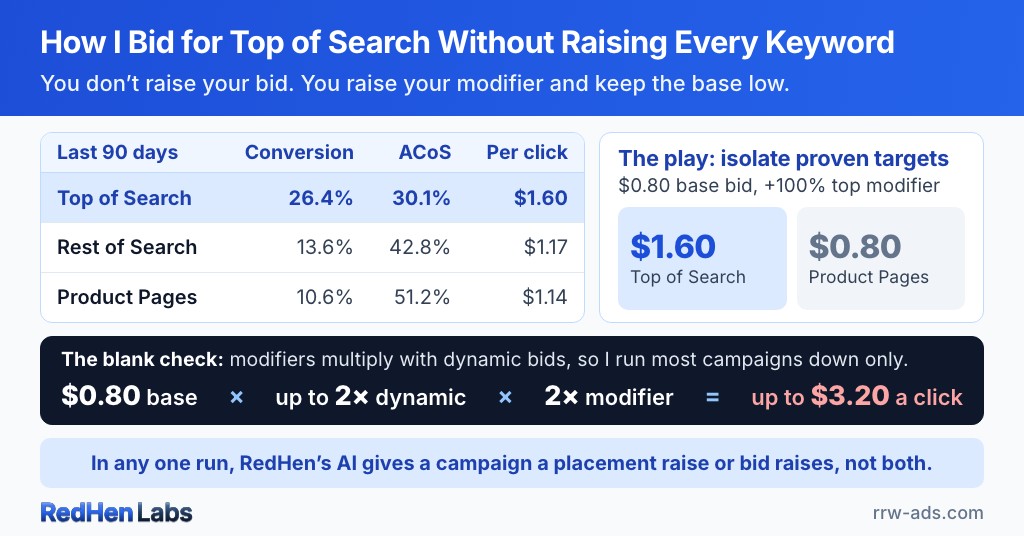
I sell wood-finishing products under Rowdy Rooster Woodworks, so these are my real numbers, last 90 days, split by placement:
- Top of Search — 26.4% conversion rate, 30.1% ACoS, $1.60 per click
- Rest of Search — 13.6% conversion rate, 42.8% ACoS, $1.17 per click
- Product Pages — 10.6% conversion rate, 51.2% ACoS, $1.14 per click
Look at what that means. Top of Search converts 2.5× better than a product-page placement. It also costs the most per click — $1.60 versus $1.14 — and it’s still by far my cheapest customer, because conversion is what actually sets your cost per sale. The cheap clicks down on the product pages are my most expensive sales: a 51% ACoS against Top of Search’s 30%.
A flat bid treats all three the same. Which means a flat bid is quietly overpaying for the worst placement to get a little more of the best one.
The real question: when is the top worth the premium?
The numbers above already make the case — for my catalog, Top of Search is the placement worth paying for. The hard part was never whether it’s valuable. It’s when it’s worth the premium to be there, and how to get there without handing Amazon a blank check for every other placement too. That’s the whole game with placement bidding: be aggressive exactly where you convert, and nowhere else.
The wrong fix: just raise your bid
The obvious move is to raise your bid so you show up at the top more often. Don’t. Your base bid lifts you in every placement at once. Raise it, and yes, you bid more for Top of Search — but you also bid more for the product-page slot that’s already running a 51% ACoS. You’d be paying more for your worst customers to get more of your best ones. That’s backwards, and it’s exactly the problem Amazon’s placement modifiers exist to solve.
What I actually do: isolate the placement
Here’s the play that works on my account. I take my proven targets — the keywords and products I already know convert — and pull them into their own campaign. Then I set the base bid low and put a high Top-of-Search modifier on top of it.
The low base bid is the trick. Amazon runs a separate auction for each placement, and your effective bid is the base times the modifier:
Top-of-Search modifier = +100%
→ Top-of-Search bid = $1.60
→ Product-page bid stays $0.80
Down in Rest of Search and on product pages, 80 cents is too low to win much — so I mostly don’t show there, which is fine, because those are my weak placements anyway. But with the +100% modifier, that same target bids $1.60 for the top slot — right where it needs to be to win the placement that converts at 26%. The campaign ends up showing almost only at the top, on targets I’ve already proven, at a price I set deliberately. I’m not raising bids everywhere. I’m concentrating them on the one placement that earns it. For my product targets, the rules engine handles most of that decision for me.
That’s the answer to “bid more for Top of Search without raising everything”: you don’t raise your bid, you raise your modifier, and you keep the base low enough to stay out of the placements you don’t want.
Product pages aren’t the enemy — they’re defensive
Notice I don’t bid up product pages at all — every one of my product-page modifiers sits at zero. That doesn’t make product pages worthless. For me they’re a defensive play, same as product targeting: I want to show on competitor and related product pages to defend my turf and catch the occasional browse-to-buy. I just won’t pay a Top-of-Search premium for it, because the shopper on a product page is in a different mindset — browsing, scrolling, comparing, not typing a high-intent search and clicking the first result. Different placement, different job. Show up there cheaply and defensively; spend your real money up top.
The blank-check problem — read this part twice
Now the warning, and it’s the most important paragraph here. A placement modifier doesn’t replace dynamic bidding — it stacks on top of it. Your real bid at the top of search isn’t your base bid, and it isn’t even your base bid plus the modifier. It’s a multiplication:
$0.80 × up to 2× × 2× = up to $3.20 a click
If you’re running dynamic “up and down” bids and an aggressive Top-of-Search modifier, those multipliers compound. Amazon raises your bid for an impression it thinks will convert, and then the placement modifier doubles that. A bid you set at 80 cents can quietly clear three dollars — and you never typed that number anywhere. Most sellers never see it coming: they set a base bid, set a placement modifier, and assume the modifier is the ceiling. It isn’t.
Dynamic bidding is the multiplier that’s hardest to predict, which is exactly why I run most of my campaigns dynamic down only, and why isolating with a low base matters — the base is the one number both multipliers are anchored to, so keeping it small caps how far the whole thing can run. Top of Search can blow up your budget as fast as it grows your sales.
What we built, and why
This is exactly the kind of decision RedHen Labs is built to make safely. It reads your placement performance from your own account — your Top of Search versus product-page split, not a generic benchmark — and judges each placement on its own numbers, leaving out the newest 3 days while their sales are still coming in. The down-only caution is the default for the campaigns it builds.
In November 2026 we rebuilt the AI’s placement step around the warning above. The AI now sees every placement’s numbers when it sizes your bids, and in any one run a campaign gets a placement raise or bid raises from it, not both, because the two multiply. And when a placement is losing money at 0% — the product pages in my numbers above — there’s no lower setting to give it, so the AI suggests one rebalance: every bid in the campaign a little lower, with Top of Search and Rest of Search raised just enough to keep their bids. That’s this article’s low-base, high-modifier play, worked out from your numbers, kept inside your limits, and approved by you as one change.
Placement rules on the Professional plan read each placement’s own numbers too, and can raise, lower or set any placement, or a campaign’s audience boosts. The AI’s placement suggestions always wait for your approval; a rule’s wait too unless you switch on Run automatically. Both are set up step by step, with screenshots, in the guides to AI bid management and placement rules. The placement lever is powerful enough to respect — so we wrapped it in guardrails instead of pretending it’s safe to set and forget. You can run both rules and an AI layer over it, because some of this is mechanical and some needs a judgment call.
The takeaway
On my account Top of Search converts more than twice as well as anywhere else — but it’s also the fastest way to torch a budget if you bid it blind. The lever isn’t the strategy. The strategy is: find your real placement split, isolate your proven winners and bid them up at the top only, leave product pages cheap and defensive, leave your base bid alone, and put a rule on the whole thing so it can’t run away. Powerful, used carefully. See your real numbers — free for 14 days.
Frequently asked questions
How do I bid more on Top of Search without raising all my bids?
Use a Top-of-Search placement bid modifier instead of raising your base bid. The base bid lifts you in every placement at once; the modifier lifts only the top-of-search bid. Set a low base bid and a high Top-of-Search modifier so the campaign concentrates spend on the top slot for your proven targets and mostly stays out of the weaker placements.
What is a good Top-of-Search bid modifier percentage?
There's no universal number — it depends on how much better Top of Search converts for you than your other placements. On my own catalog Top of Search converts about 2.5x better than product pages, so I run modifiers up to +100% on proven, high-converting campaigns and little or none on auto and discovery campaigns that haven't earned it yet. Set it from your own placement report, not a benchmark.
Does the Top-of-Search modifier stack with dynamic bidding?
Yes, and it's the biggest risk in placement bidding. Your real top-of-search bid is base bid times dynamic-bid increase times placement modifier. With dynamic up-and-down bids and a +100% modifier, an 80-cent base bid can clear $3 a click — a number you never typed. That's why many sellers run dynamic bids down-only and keep the base bid low when they use an aggressive placement modifier.
Should I bid up product-page placements too?
Usually not at a premium. Product-page placements tend to convert worse than Top of Search because the shopper is browsing and comparing, not searching with high intent. They're valuable defensively — to show on competitor and related listings — but that's a reason to show up cheaply, not to pay a top-of-search-style premium.
What if a placement is losing money and is already at 0%?
Sponsored Products can't go below 0%, so lower the campaign's bids instead and raise the placements that are working by just enough to keep their bids. With Top of Search at 30%, bids 10% lower and Top of Search at 44% leave its bid where it was, so only the losing placement gets cheaper. RedHen's AI profiles suggest this as one rebalance you approve, sized from your own placement numbers.
Related reading
Do it step by step in RedHen Labs
Ready to automate the right way?
RedHen Labs combines rules with AI — and keeps you in control.