How I Audit My Amazon PPC Account (30-45 Minutes, Manual Version)
I run this audit on my own seller account (Rowdy Rooster Woodworks) and the same one on customer accounts when I get a fresh look. It's the manual version of what our automation runs continuously — same checks, same priorities, just done by hand. Useful if you want to understand what to look at before deciding whether to automate the work.
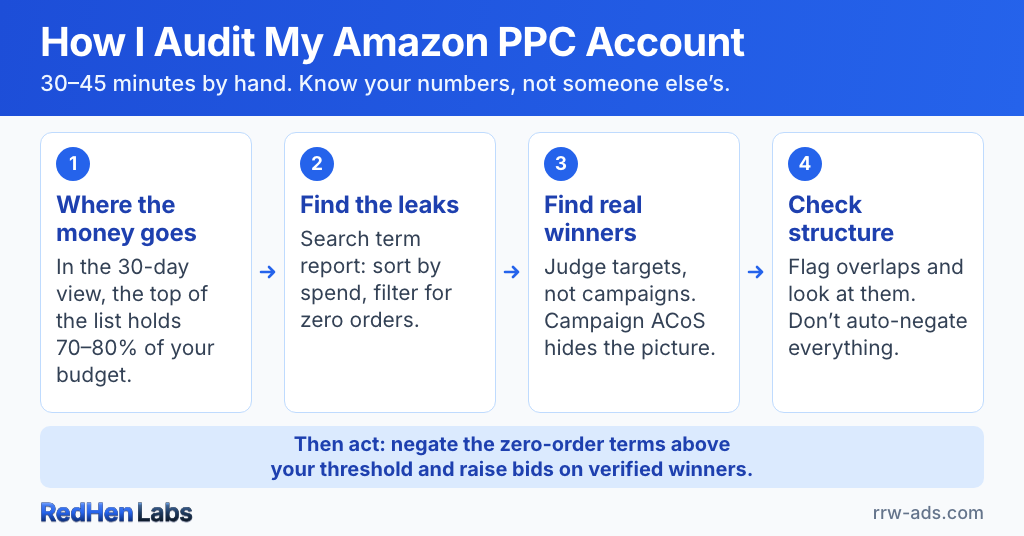
30-45 minutes once you know what you're looking for. Longer the first time. The point isn't speed — it's having a repeatable framework so the audit is a real check on the account, not a tour through Seller Central with no clear conclusion.
Short on time? The free Amazon PPC audit tool grades your account A-F from four questions in 30 seconds — no CSV upload — and gives you a rough waste estimate before you commit to the manual pass below.
Before you start: know your numbers, not someone else's
Most PPC advice gives you a one-size-fits-all benchmark: "ACoS under 30% is good." That benchmark is meaningless without context. Different businesses can tolerate wildly different numbers.
- My Rowdy Rooster account targets ~30% ACoS, 18% TACoS. TACoS matters more here because it captures the relationship between ad spend and total revenue, not just the ad-attributed slice.
- A supplements brand with subscription revenue can sometimes justify 60% ACoS on first-customer acquisition because the lifetime value comes from rebills.
- A commodities brand competing on price might only tolerate 20% ACoS, 10% TACoS — there's no margin headroom.
Before the audit, calculate two numbers for your own account: break-even ACoS per top SKU (margin after fees ÷ price × 100) and your target TACoS (the percentage of total revenue you're willing to spend on ads to stay healthy). Those are the anchors. Everything below is judged against them.
Step 1: Where is the money going?
Open the Advertising dashboard, 30-day window. Sort campaigns by spend, highest first. The top of that list is where 70-80% of your budget lives. For each of the top campaigns, write down spend, ad sales, and ACoS.
The campaigns to flag aren't "anything above 30% ACoS." They're campaigns above the break-even ACoS for the SKUs they're advertising. A campaign at 40% ACoS on a high-margin product can be fine; the same 40% on a thin-margin product is bleeding money.
Step 2: Find the leaks in the search term report
Pull the search term report for the top-spending campaigns. Sort by spend, filter for zero orders.
The dollar threshold for "this is bleeding" depends entirely on the product. My case-pack SKUs can tolerate something like $60 of spend on a search term before I'm concerned — the per-unit margin is high enough that one or two delayed conversions still pencil. A low-margin single-unit product might be a problem at $8 of zero-order spend. The right way to set the threshold is: what's the most you'd spend on a clearly-not-converting term before the math against your break-even no longer works? That number is your negate-it-now line.
Negate everything above that line as exact-match negatives in the source campaign. Phrase-match negatives are a bigger move — save them for terms whose entire family you want to kill, not for one-off losers. Our free PPC waste calculator does this analysis on a search term report in seconds if you'd rather not eyeball it.
Step 3: Identify real winners — at the target level, not the campaign level
The textbook advice is: sort campaigns by ACoS ascending, raise budgets on the low-ACoS ones. That works on a small, clean account. On most accounts it's misleading.
Campaign-level ACoS hides the picture. A campaign showing 12% ACoS might be:
- A branded campaign converting shoppers who would have bought you anyway (cannibalizing organic)
- A tiny campaign with one lucky order — statistical noise pretending to be a winner
- A campaign with one converting keyword carrying 20 wasted keywords (budget mostly going to the losers)
The right move is to evaluate the targets inside the campaign individually — which specific keywords or ASIN targets are driving conversions at acceptable ACoS, which ones are dragging the average down. Raise budgets and bids on the proven targets, not on the campaign that contains them. This is the kind of analysis our Amazon PPC automation rules do continuously — manually it's the most time-consuming step of the audit, which is why a lot of operators skip it.
Step 4: Campaign structure — but with nuance
The textbook check: are the same search terms running in multiple campaigns? If yes, you're bidding against yourself. That's correct in the simple case — and worth looking at — but it's not absolute.
If your auto campaign has placement multipliers tuned, an exact-match version of the same term in a separate campaign can be intentional — the two are competing for different placements at different multipliers, not the same eyeballs. Reflexively negating the term in auto can throw off a balance you've already worked on. Broad targets used for discovery shouldn't be negated either — they're the listener for new variants.
The full nuance is in our keyword harvesting guide. Short version for the audit: flag overlaps and look at them deliberately — don't auto-negate everything that appears in two places.
What to do with what you found
Two real actions:
- Negate the zero-order terms above your threshold. This stops the bleed immediately. Negative exact in most cases; negative phrase only when you genuinely want the whole term family dead.
- Raise bids/budgets on the targets you actually verified as winners (not campaigns — targets). Confirm with at least 14 days of data per the harvest cadence; one good week is noise.
"Fix the money pits" is the same exercise as the first two — you've already identified them and acted on them. The redundant third step in most audit guides exists to make the workflow look thorough; it isn't a separate move.
Cadence: with no automation, weekly search-term scans + a full monthly deep audit is the bare minimum to keep an account from drifting. The harvest loop runs on a 14-day lookback to keep fluke conversions from skewing it. With automation, most of the loop runs continuously and the manual audit becomes a sanity check on the system, not the system itself.
The honest result from my own account
I've been running Rowdy Rooster on this framework — automation-assisted — for a few months and have seen roughly 25% improvement in ad cost over that window. I'll caveat that the account is also our internal test bed for new features, which adds noise to the baseline. The point is less the specific number and more that an audit applied consistently, with the operator's actual break-even and TACoS targets as anchors, moves the needle. Generic 30%-ACoS-is-good advice does not.
Or run it continuously without doing it by hand. RedHen flags waste, evaluates targets individually, and surfaces specific negations and bid changes for your approval — same framework, no spreadsheet hours. For the cheat-sheet companion to this article, see our 12-numbers audit checklist. Or try the platform free for 14 days.
Frequently asked questions
How do you do an Amazon PPC audit yourself?
Pull your campaign, search-term, and targeting reports, then check a fixed set of numbers in order: total spend versus sales, ACoS versus your break-even, wasted spend on zero-order search terms, and which campaigns and keywords carry the account. You can run the whole pass in about 30 minutes without an agency.
Is there a free Amazon PPC audit?
Yes. RedHen Labs offers a free PPC waste calculator: upload your Amazon Search Term Report and it surfaces the keywords and search terms burning money in under a minute, with no signup. It runs entirely in your browser.
What should an Amazon advertising audit cover?
At minimum: wasted spend (search terms with clicks and no orders), true profitability after COGS and FBA fees rather than ACoS alone, bid efficiency against your target ACoS, negative-keyword gaps, and campaign structure. The goal is to find the leaks and the winners, then know exactly what to change.
How long does an Amazon PPC audit take?
A focused self-audit takes about 30 minutes once your reports are exported. The free waste calculator gives you the wasted-spend slice in under 60 seconds.
Related reading
Do it step by step in RedHen Labs
Ready to automate the right way?
RedHen Labs combines rules with AI — and keeps you in control.