Amazon PPC Audit Checklist: 12 Numbers Before Touching Your Bids
These are the 12 numbers I pull on my own Rowdy Rooster Woodworks account before I touch a single bid. The order matters — cost first, then spend, then return, then control. Get the numbers down on paper; let them tell you what to fix. Most "audits" go sideways because someone clicks around campaigns on a Tuesday afternoon, reacts to whatever caught their eye, and then can't remember by Friday why they changed it.
If you want the full narrative methodology behind each number, the 30-minute PPC audit guide walks through it in long form. This page is the cheat sheet.
The short version
- This checklist is the 12 numbers pulled on the Rowdy Rooster Woodworks account before any bid is changed, in a fixed order: cost, then spend, then return, then control.
- The bid-correction formula used on that account is New Bid = Current Bid × (Target ACoS ÷ Actual ACoS), so a $1.20 bid running 40% ACoS against a 20% target corrects to $0.60.
- Account ACoS on its own is just a number — it only means something compared against break-even ACoS, which is (margin after fees ÷ price) × 100.
- There is no universal healthy TACoS: the Rowdy Rooster account targets around 18% by design, which is too high for a mature account in coast-and-harvest mode and too low for one expanding into a new category.
- Writing the numbers down first is the point, because an audit done by clicking around reacts to whatever caught the eye and cannot be reconstructed days later.
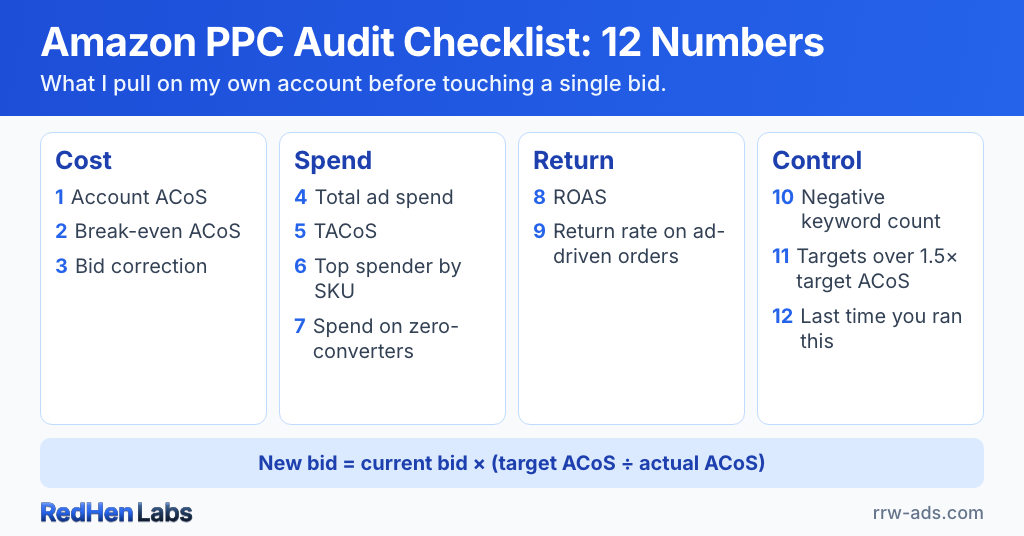
Bucket 1: Cost (what's a click really worth?)
- Account ACoS (30-day): Total ad spend ÷ total ad sales. Write it down. You'll compare it against break-even ACoS in #2; on its own it's just a number.
- Break-even ACoS: (Margin after fees ÷ price) × 100. Calculate per SKU, take a weighted average across the account. Most sellers can't name this number for their own catalog — which is exactly why "ACoS looks fine but profit doesn't" is so common. See why a 25% ACoS can still lose money.
- Bid-correction formula (avg CPC vs. target): The formula I actually use — and the one we built into the bid review screen — is:New Bid = Current Bid × (Target ACoS / Actual ACoS)Example: a target with a $1.20 bid running 40% ACoS against a 20% target gets corrected to $0.60. When my account starts drifting out of range, I baseline every active bid through this formula and let the rules nudge them back over the next week. The cleaner-sounding "(price × margin) ÷ click-to-order ratio" derivations look tidy on paper and fall apart against real campaign data.
Bucket 2: Spend (where is the money going?)
- Total ad spend (last 30 days): Absolute dollars. Anchor for everything else.
- TACoS (ad spend ÷ total revenue): There is no universal healthy range. My RRW account targets around 18% by design. If you're a mature seller in coast-and-harvest mode, 18% is too high — you're spending past what organic could carry. If you're trying to expand brand awareness or break into a new category, 18% is too low — you're under-investing in the visibility you need. Decide what job the account is doing before judging the number.
- Top spender by SKU: The single product consuming the most ad spend. Cross-reference: is it also generating the most ad-attributed sales? If the answer is no, you've found your first re-allocation candidate.
- Spend on zero-converters: Pull the search term report, sum spend on terms with zero orders in the lookback window. Whatever the number is, those dollars are the easiest cleanup you'll do this quarter — there is no magic threshold; any meaningful share is too much. Full method in the search term audit guide.
Bucket 3: Return (what came back?)
- ROAS (ad sales ÷ ad spend): Inverse of ACoS, easier to think about for some sellers. Target ROAS ≥ 1 ÷ break-even ACoS.
- Return rate on ad-driven orders: Pulled from SP-API reports. A high return rate on a "winning" keyword can flip its true ACoS underwater. Most common in apparel, supplements, and anything where product fit varies by buyer.
Bucket 4: Control (are you driving or being driven?)
- Negative keywords across the account: The absolute count matters less than whether it's growing month over month. Flat negatives = search terms aren't getting cleaned up, and that's almost always cheaper to fix than chasing bid optimization. Continuous harvesting is how I keep this number moving without it eating my Sundays.
- Targets where Actual ACoS > 1.5× Target ACoS: This is the queue of bid corrections you owe yourself. In the app we surface this list directly so you can baseline them in one pass using the formula in #3. In raw reports, filter the target-level export and count the rows. Either way, the number tells you how much bid work is sitting in the inbox right now.
- Last time you actually ran this audit: Be honest. I built a software company partly so this question wouldn't hang over my own account every week — RedHen runs this audit continuously, flags waste, and surfaces specific bid and negation actions for approval. If you don't have automation, a weekly search-term scan plus a monthly full audit is the workable manual cadence.
What to do with the numbers
Three rules.
First, fix waste before chasing growth. Negating zero-converters and pausing money-pit SKUs frees budget you'll redirect into the winners — and gives the winners room to actually win without raising total spend.
Second, calibrate your data window to the size of the move. Incremental bid changes are fine on about 14 days of data — enough to filter one-week noise without being so cautious you miss a trend. Betting-the-ranch decisions (tripling a campaign's budget, raising bids across the whole portfolio, killing a category) need closer to a full month before you commit.
Third, don't tinker with bids when the underlying problem is margin. A higher bid on a thin-margin product just bleeds you faster. Go fix COGS, fees, or price first; come back to PPC after.
If pulling 12 numbers by hand sounds like a Sunday afternoon you'd rather not spend, the free PPC Waste Calculator surfaces the spend-side numbers in a couple of minutes. Or try the full platform free for 14 days.
Related reading
Do it step by step in RedHen Labs
Frequently asked questions
What is the bid correction formula for Amazon PPC?
New Bid = Current Bid × (Target ACoS ÷ Actual ACoS). A target with a $1.20 bid running 40% ACoS against a 20% target corrects to $0.60. This is the formula used on the Rowdy Rooster Woodworks account and built into the bid review screen; when the account drifts out of range, every active bid is baselined through it and the rules nudge them back over the following week. Tidier-looking derivations such as (price × margin) ÷ click-to-order ratio fall apart against real campaign data.
What order should you check numbers in during an Amazon PPC audit?
Cost first, then spend, then return, then control. Cost establishes what a click is actually worth by comparing account ACoS against break-even ACoS. Spend shows where the money is going in absolute dollars. Return and control follow. The order matters because a number like account ACoS carries no meaning until there is a break-even figure to judge it against.
Why write the numbers down before changing Amazon bids?
Because an audit done by clicking through campaigns reacts to whatever happened to catch the eye, and cannot be reconstructed afterwards. Most audits go sideways when someone clicks around on a Tuesday afternoon, changes what looked wrong, and by Friday cannot remember why. Getting the figures onto paper first lets the numbers decide what to fix rather than the order they were noticed in.
Ready to automate the right way?
RedHen Labs combines rules with AI — and keeps you in control.