How to Read Your Amazon Advertising Report (Without Getting Lost)
I sell cutting board oils, wax and a cutting board gel on Amazon, and I read my advertising reports most mornings. I don’t download them anymore: RedHen Labs pulls the same reports from Amazon every night, and I read them there. The reading is the same wherever you open them, and so are the mistakes that are easy to make.
Here’s what I look at in each one, with numbers from my own US account for the 30 days to November 7.
The short version
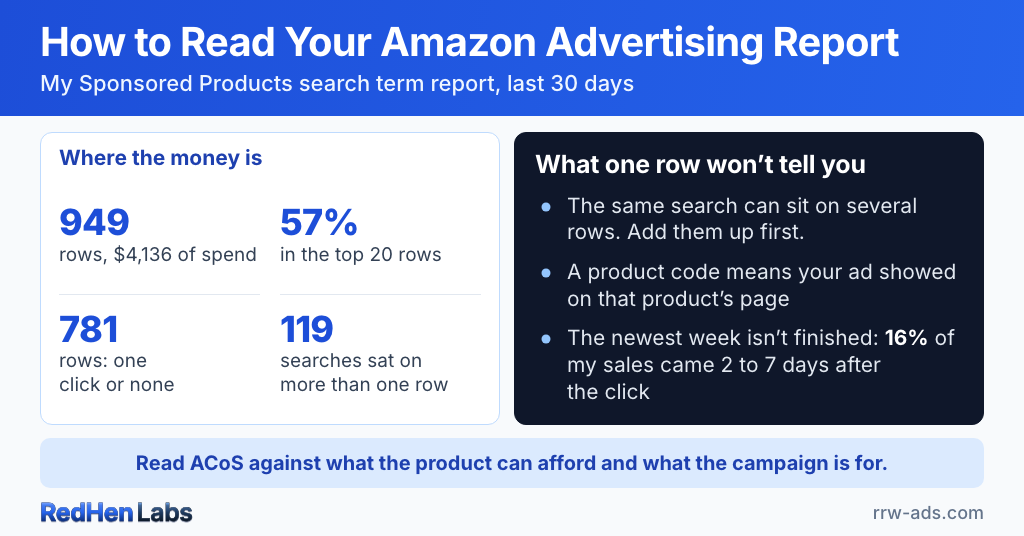
- Start at the top of a spend-sorted search term report: on my account the top 20 rows took 57% of 30 days of Sponsored Products spend, while 781 of 949 rows had one click or none.
- A row is a search term plus the keyword that caught it in one campaign. 119 of my 753 search terms were on more than one row, so total a search before deciding it doesn't sell.
- A product code in the search term column means your ad showed on that product's page; one brought me 79 orders in 30 days at $8.25 an order.
- 16% of my Sponsored Products sales came 2 to 7 days after the click, so the newest week of any report isn't finished.
- Read campaign ACoS against what the product can afford and what the campaign is for: a discovery campaign at 73% isn't a performance campaign at 73%.
Where to find them
In Amazon’s ad console, open Measurement & Reporting in the left menu, then Sponsored ads reports, then Create report. Choose the ad type, then the report type. Three answer most of my questions:
- Search term: what shoppers typed, or which product page they were on, before they clicked your ad.
- Targeting: how each keyword or product target did at its bid.
- Campaign: spend, sales and ACoS for each campaign.
Amazon offers more (placement, budget, advertised product), and Sponsored Brands has its own set. Start with these three, for Sponsored Products.
Start at the top of the search term report
Sort it by spend. Last month my Sponsored Products search term report had 949 rows and $4,136 of spend, and the top 20 rows took 57% of it. That’s where most of the money is, so that’s where I start.
The other end matters for a different reason. 781 of those 949 rows had one click or none. That isn’t waste to hunt down. It’s what a search term report looks like: a short head where the money is, and a long tail of searches that each got a look.
A row isn’t a search term
Each row is a search term plus the keyword or target that caught it, in one campaign. When several of your keywords match the same search, it shows up once for each. Last month 119 of my 753 search terms were on more than one row.
“walnut oil” was on 6 rows. 2 of them had no orders, with one or two clicks each. Across all 6 it had 36 orders on $214 of spend. Read one of the empty rows by itself and you might decide the search doesn’t sell. It sells. It just didn’t sell through every keyword that caught it.
So I read a row and a total as two different answers. The row says whether a search works in that campaign. The total says whether it sells at all. That’s why my negatives work per campaign: a search with 20 clicks and no order in 30 days is added as a negative exact in that campaign (10 clicks in 14 days on two of them), and it keeps running wherever it sells. Each one waits for my approval. In RedHen, the cross-campaign view puts every row of a search side by side.
Some search terms weren’t typed
Some rows show a product code like B01B5ECU3O instead of words. Nobody typed it. Your ad showed on that product’s page, through a product target or automatic targeting, and the shopper clicked it there.
That code was my second-biggest search term last month: $651 of spend and 79 orders, $8.25 an order. My biggest typed search, “walnut oil for wood,” cost $7.67 an order. A product page can earn its place next to your best keywords.
Two of the codes are my own products, the gel and the walnut oil. That’s defensive targeting: if my ad takes a spot on my own page, a competitor’s ad can’t take that spot. Those rows have a different job, so I don’t hold them to the same ACoS as a typed search. The gel’s page cost $70 last month and brought 10 orders.
The newest week isn’t finished
For sellers, a Sponsored Products report credits an order to a click if it happens within 7 days. In October, 16% of my Sponsored Products sales came 2 to 7 days after the click. A search with clicks in the last few days and no order may simply not have sold yet.
Before I call a search a dud, I make sure the date range ended at least a week ago. And Sponsored Brands reports count 14 days, not 7, so adding the two sales columns together mixes two different windows.
What I do with a search term
- One or two clicks, no order: nothing. Most rows are this, and there’s nothing in one click to judge.
- 20 clicks and no order in a campaign: a negative exact in that campaign, once I approve it.
- 2 orders in 30 days: it moves to its own exact-match keyword, where it gets its own bid. That’s my harvest rule.
As clicks add up, a search in the tail either sells and moves up, or reaches 20 clicks without an order and gets negated. The rest of my spend, and where it goes, is in Amazon Ads Too Expensive?
The campaign report: ACoS against the product and the job
The campaign report shows which campaigns earn their spend, but ACoS alone doesn’t tell me. Two things decide whether a number is good: what the product can afford, and what the campaign is for.
What the product can afford. My cutting board gel leaves about 42% of its price for ads and profit after Amazon’s fees, product cost and freight. Its biggest campaign ran at 50% ACoS last month. That’s above break-even on purpose: I’m buying sales velocity for it right now. The same 50% on a product that can afford 30% would be a problem.
What the campaign is for. My 100AsinCompetitor campaign ran at 73%. It’s a discovery campaign: the gel’s ad on 179 other products’ pages, to find out which pages turn into sales. Its job is to find the pages worth a performance campaign, not to be profitable this month. I’ve been reading it closely this week because I’m about to run the same test for my new cutting board oil.
A performance campaign at 73% would get my attention fast. A discovery campaign at 73% gets read for what it found.
The targeting report: what each keyword does at its bid
This is where bids get decided. Two patterns are worth knowing:
- Lots of impressions, few clicks: the ad shows and shoppers skip it. Either the search isn’t really for your product, or your main image, price or reviews lose next to the others on the page.
- Lots of clicks, few orders: shoppers are interested, then leave. Look at the listing, the price, and whether the search was really for your product.
Impressions alone aren’t a reason to raise a bid. Orders at an ACoS the product can afford are. I set bids with rules, and I’ve published mine with every threshold: under 30% ACoS with enough orders gets a raise, 30% to 60% gets pulled back toward 30%, 60% or more is paused, and no rule bids above $2.00.
Why I read them in RedHen
The data is Amazon’s either way. What changed for me is that I don’t spend mornings in spreadsheets. RedHen pulls these reports every night, my rules and harvests run off the same data, and the cross-campaign view shows a search across every campaign at once.
Want to see what your own reports say first? The free 30-second PPC audit grades your account in a minute. RedHen Labs has a 14-day free trial, and pricing is flat, never a percentage of your ad spend.
Frequently asked questions
What are the main Amazon advertising reports?
Three answer most questions for a seller: the search term report (what shoppers typed, or which product page they were on, before clicking), the targeting report (how each keyword or product target did at its bid) and the campaign report (spend, sales and ACoS per campaign). In Amazon's ad console they're under Measurement & Reporting, then Sponsored ads reports, then Create report.
Which Amazon advertising report is the most important?
The search term report, because it shows what actually happened between your targets and your shoppers. Sort it by spend and start at the top: on my account the top 20 rows took 57% of 30 days of Sponsored Products spend. Each row is a search term plus the keyword that caught it in one campaign, so total a search across its rows before deciding it doesn't sell.
Why does my Amazon search term report show ASINs?
A product code such as B01B5ECU3O in the search term column means your ad showed on that product's detail page, through a product target or automatic targeting, and the shopper clicked it there. Nobody typed it. These rows can be among your best: on my account that one brought 79 orders in 30 days at $8.25 an order.
Why do the last few days of my Amazon ad report show so few orders?
Because the orders aren't all in yet. For sellers, Sponsored Products credits an order within 7 days of the click and Sponsored Brands within 14. In October, 16% of my Sponsored Products sales came 2 to 7 days after the click. Judge search terms on a date range that ended at least a week ago.
When should I add a search term as a negative keyword?
When it has had enough clicks in a campaign to judge and still no order. My rule is 20 clicks and no order in 30 days, added as a negative exact in that campaign only, so the search keeps running wherever it does sell. One or two clicks with no order is too little to judge.
Is a high-ACoS campaign always a problem?
No. Compare it with what the product can afford and with what the campaign is for. My cutting board gel can afford about 42%, and its biggest campaign ran at 50% because I'm buying sales velocity on purpose. A discovery campaign testing 179 product pages ran at 73%, which is fine for a campaign whose job is to find the pages that sell.
Related reading
Do it step by step in RedHen Labs
Ready to automate the right way?
RedHen Labs combines rules with AI — and keeps you in control.