Ready to automate the right way?
RedHen Labs combines rules with AI — and keeps you in control.
When You Move a Keyword to Exact, Do You Negate It in the Auto Campaign?
On my Rowdy Rooster Woodworks account, auto campaigns have exactly one job: discovery. I’m not trying to win sales there — I’m trying to find out what real shoppers type before they buy a cutting board oil. Auto is a net. It catches search terms I’d never have thought to add myself.
But the moment one of those terms starts converting, you run into the fact that quietly governs this whole decision.
You steer keywords, not search terms
In an auto campaign, Amazon matches your ad to search terms — and you cannot set a bid on an individual search term. You can nudge the whole campaign up or down, but you can’t tell Amazon “bid $1.10 on food safe cutting board oil specifically.” The only way to get that control is to make the term a keyword in a manual campaign. That’s all harvesting really is: taking a proven search term out of the discovery net and turning it into a keyword you can bid on, budget for, and defend. Internalize that one mechanical fact and every other decision here follows from it.
So a term converts — food safe cutting board oil picks up a couple of orders — and I graduate it into its own exact-match campaign at a bid I chose. I’ve done that more than a hundred times (here’s the full auto-to-exact harvesting workflow).
Now the real question: do you negate it back in the auto campaign?
This is the step most sellers forget. Once the term lives in your exact campaign, it’s still live in the auto campaign too — unless you go add it as a negative. Leave it, and both of your own campaigns are eligible for the same search. And here honest people disagree. Two schools of thought, with the reasoning behind each:
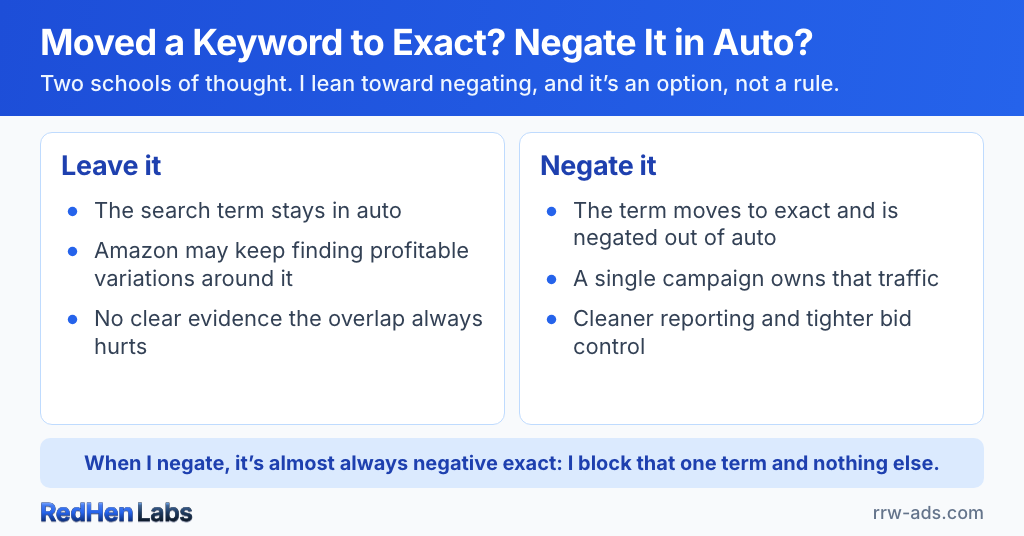
- Leave it. Keep the search term in auto, because Amazon may keep finding profitable variations around it, and there’s no clear evidence that overlapping eligibility always hurts performance. Adding friction to a winner is its own kind of risk.
- Negate it. Move the proven search term into a manual exact campaign and negative-exact it out of auto, so a single campaign owns the bid and budget for that search. One place to tune, one place to report, one place to defend.
I lean toward negating — but let me be precise about why, because it’s easy to overclaim here. I’d rather not have multiple campaigns eligible for the same search, because I prefer knowing exactly which campaign owns that traffic. That’s a preference for control and clean ownership, not a claim that overlap is provably costing me money.
I won’t pretend I have the data to settle it
I don’t have a dramatic before-and-after for you, because I don’t have one. All my products live in one tight keyword cluster, so I’ve got campaigns eligible for overlapping searches all over the place, and Amazon decides which of mine shows — a process its documentation doesn’t fully expose. I can’t see inside that, and I don’t have a big enough dataset to declare one school objectively wrong. Anyone who tells you they’ve proven “always negate” or “never negate” is selling you a certainty this system doesn’t offer. What I can give you is the reasoning I actually act on — and a tool that lets you act on the opposite one.
That’s why it’s an option, not a rule
When you set up a harvest, “add the term as a negative in the source” is a checkbox, per automation. Both choices are first-class. Most of my harvests have it on. A couple have it off, on purpose:
- Sometimes I harvest a term from a Sponsored Products campaign into a Sponsored Brands campaign. Different ad type — I still want to keep bidding on it in Sponsored Products, so I don’t negate.
- And when I’m harvesting into a campaign with placement modifiers, sometimes I want the source left exactly as it is.
The point isn’t which box you check. It’s that a tool shouldn’t hand you a debated best-practice as if it were settled law.
Negative exact, not phrase
When I do negate, it’s almost always negative exact — I block that one specific term and nothing else. That’s a deliberate tradeoff. Owning a proven term in its own exact campaign buys you:
- cleaner reporting
- tighter bid control
- easier budgeting
- simpler optimization
And the tradeoff that comes with negative exact specifically: auto stays eligible for close variants you haven’t harvested yet. That’s usually a feature, not a bug — it’s auto’s whole job to keep surfacing the next variation — but it does mean some overlap lingers at the edges, and it’s exactly why I don’t reach for negative phrase. Phrase is a big swipe: it kills a whole family of variations at once and shuts down the discovery you were counting on. I’ll use it once in a while, by hand, when I’ve looked and decided a variation would just keep costing me money. But that’s the exception. Exact is surgical; phrase is a hatchet. (For the automated version of the whole flow, see negative keyword automation.)
The negative follows the harvest, not the term
A search term doesn’t necessarily come from one place. On my account, 109 distinct search terms have graduated to exact match. Fourteen of them graduated out of more than one source campaign. One — “walnut oil for wood” — came out of four campaigns and landed in six.
Overlap isn’t automatically duplication. In my account it usually comes from one of three deliberate decisions:
- Different products. The same search surfaces several of my oils, and each product’s campaign proved the term on its own.
- Different campaign types. If a term is working in auto, I’ll often harvest it into a Sponsored Products campaign and a Sponsored Brands one. Same term, two ad types, two jobs.
- A campaign on its way out. When I’m retiring a campaign I cherry-pick the proven terms out of it first, into a campaign that’s staying. That creates overlap on purpose — and no, I don’t negate in a campaign I’m about to shut off anyway.
The structured setup in RedHen Labs assumes this. It builds four campaigns that work together: an auto campaign and a category-targeting campaign doing the discovery, feeding a keyword performance campaign and a product performance campaign that hold the winners. The product performance campaign harvests from both discovery campaigns by design.
So here’s the mechanical fact worth holding onto: negate-in-source applies to the campaign that produced that harvest. It doesn’t chase the term across your account. If a term proved itself in three campaigns and you harvested it out of one, the other two stay eligible for that search until you add the negative there too.
Whether that matters depends entirely on what those other campaigns are for — and you’re the one who knows that. If you built the structure, you already know which of them you want eligible for that search. If you haven’t built one yet, that’s what structured campaign creation is for: it wires the discovery and performance campaigns together so the harvesting has somewhere to go.
An ASIN negative has no campaign level
Everything above is about keywords. I harvest ASINs the same way and for the same reason — isolate the winner, put it where I can set its bid on purpose — but the negative you write back is not the same tool. A negative keyword can live at the campaign level or the ad group level; you pick. A negative product target has no campaign level at all, so it goes on the one ad group the placement came from. The mechanics of that are in the ASIN harvesting piece. What I want to add here is why I ran this for years without the difference ever surfacing.
My account has 151 live campaign-level negative keywords. It has 42 negative product targets, and every single one sits at the ad group, because that is the only place Amazon accepts one. Two different tools, and I never felt the difference.
Here is why. All 44 of my enabled campaigns have exactly one ad group. That is deliberate — one campaign, one ad group, one job — and the control comes from the isolation, not from the level I happen to be operating at. It has a side effect I never designed for: on my account, “campaign level” and “ad group level” are the same place. The limitation is real, and my own structure made it invisible.
It stops being invisible the moment a campaign holds several ad groups. Negate the harvested ASIN in the ad group it came from, and the other ad groups in that campaign stay eligible for it — while your new product-targeting campaign bids on it too. That is the overlap the negative was supposed to prevent, still sitting there. So “negate in source” does not necessarily mean “no more overlap with the source campaign”; for an ASIN it means the one ad group.
I’d like to tell you I caught this because something broke. I didn’t — I have never noticed a negative product target behave in a way I didn’t expect, which is exactly what you’d expect from a structure where the distinction can’t show up. If you run multi-ad-group campaigns, you don’t have that cover.
In the software, negate-in-source is the same checkbox for an ASIN harvest as for a keyword harvest. What the checkbox can do differs, though, and that’s Amazon’s boundary, not a setting we chose.
When a term earns the move
I don’t graduate on a single order — one order is noise, could be a fluke. I let a term prove itself at two or three orders in a 30-day window before it earns its own campaign. That number isn’t sacred; set it to match how big you’re playing. The principle is just “enough orders that it’s a signal, not a coincidence.”
What the software does
Every harvest that has run on my account came to me as a proposal first — I see each graduation before it happens. Auto-apply exists and I use it in a couple of narrow places, but I don’t recommend turning it on until you’ve watched an automation run for a while and you know what it does. A rules engine gets complicated fast; earn your trust in it before you hand it the wheel. The software can review qualifying search terms on a schedule you configure, move the winners into the exact campaign at a bid you set, and — if you’ve left the box checked — drop the negative-exact into the source. There’s even a guard so it won’t negate a term into a campaign that’s also a destination, which would quietly cancel the harvest. The tedious part of the job, done consistently, with you still holding the wheel. (It’s the same philosophy behind why I run both rules and AI on my own account — automate the work, keep the decisions.)
So — do you have to negate?
The question isn’t whether negative-exact is objectively correct. It’s whether you value discovery or control more for that particular search term. I generally choose control once a term has proven itself — but I built the software to support either philosophy, because the honest truth is the data can’t yet crown a winner, and your tool shouldn’t pretend otherwise.
That principle goes past one checkbox. When we audited the automation features, it was the standard we held them to: if you’ve told the software what you want, its job is to execute it faithfully — not to assume you made a mistake because your structure isn’t the one it expected. You know why your campaigns are arranged the way they are. The software doesn’t need to.
Frequently asked questions
When you move a keyword to exact match, do you have to negate it in the auto campaign?
You don't have to — it's a legitimate choice, not a rule. Two schools of thought exist: leave the term in auto because Amazon may keep finding profitable variations, or negate it (as negative exact) so one manual campaign owns the bid and budget for that search. I lean toward negating for the control, but there's no proof that overlapping eligibility always hurts, so RedHen Labs makes negate-in-source an option on every harvest, not a mandate.
Should the negative be exact or phrase match?
Almost always negative exact. It blocks only that one specific term, so the auto campaign keeps doing its real job — discovering the next converting variation. Negative phrase is a much bigger swipe that removes a whole family of variations at once, so reserve it for the rare case where you've decided a variation would only keep costing you money. Exact is surgical; phrase is a hatchet.
Why negate a harvested keyword at all?
So a single campaign owns the bid and budget for a proven search. In an auto campaign Amazon matches to search terms, and you can't set a bid on an individual search term — you only get that control once the term is a keyword in a manual campaign. Negating it in the source keeps two of your own campaigns from being eligible for the same search, which muddies your reporting and bid control.
When should a search term graduate from auto to exact?
When it's proven, not on a single order — one order is noise. A common gate is two or three orders in a 30-day window; set the bar to match your volume, since a larger account can afford a stricter rule. The point is enough orders that it's a real signal, not a coincidence.
What if the same search term is converting in more than one of my campaigns?
That happens more than people expect — on my account, 14 of 109 harvested terms graduated out of more than one source campaign. The key mechanical fact is that negate-in-source applies to the campaign that produced that particular harvest; it doesn't chase the term across your whole account. So if a term proved itself in three campaigns and you harvested it out of one, the other two stay eligible until you add the negative there too. Overlap isn't automatically duplication — it's often deliberate, like running the same winner in both a Sponsored Products and a Sponsored Brands campaign, or cherry-picking proven terms out of a campaign you're retiring.
Can you negate an ASIN at the campaign level like a negative keyword?
No. A negative keyword can sit at either the campaign level or the ad group level — you choose. A negative product target only exists at the ad group level; there is no campaign-level equivalent on Amazon. All 42 negative product targets on my account sit at the ad group across 14 ad groups, because that's the only place Amazon accepts one. So "negate it in the source campaign" is a sentence that works for a keyword and doesn't work for an ASIN — you're negating in one ad group, not across a campaign.
Does that ad-group limit actually cost you money?
On my account, no — and the reason is structural rather than lucky. All 44 of my enabled campaigns have exactly one ad group, so "campaign level" and "ad group level" are the same place for me. It starts costing you the moment you run campaigns with several ad groups: you negate the harvested ASIN in the one ad group it came from, the other ad groups in that campaign stay eligible for it, and your new product-targeting campaign is bidding on it too — which is the exact overlap the negative was meant to prevent.
Related reading
Do it step by step in RedHen Labs