Ready to automate the right way?
RedHen Labs combines rules with AI — and keeps you in control.
Which Negative Keywords Actually Save Money (I Run 69 on My Entire Account)
The standard advice is to build a big negative keyword list. Mine is 69 distinct keywords across 43 live campaigns on my Rowdy Rooster Woodworks account. All exact match. Not one negative phrase.
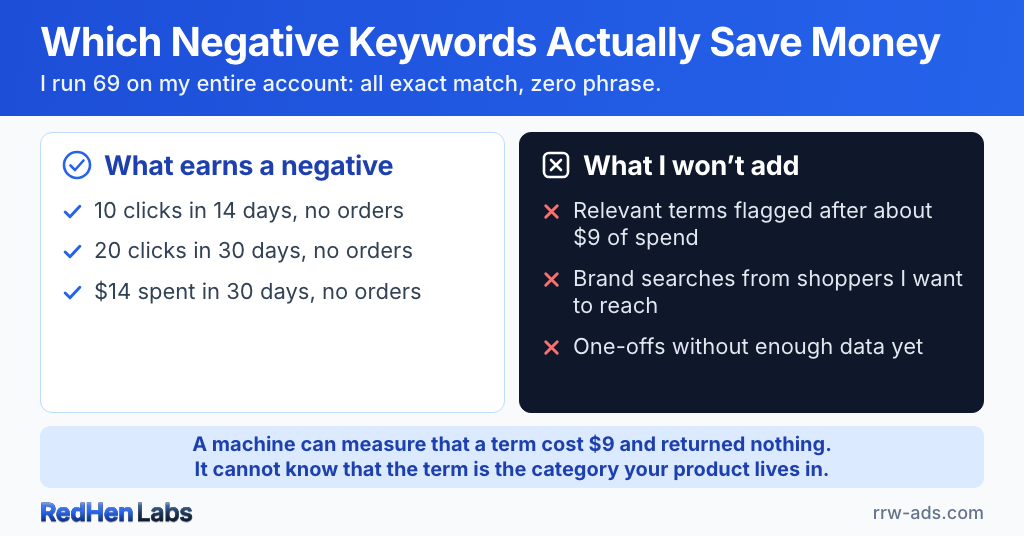
That’s not neglect. It’s the result of turning down almost every negative my own software has suggested.
Harvesting and negating are not symmetrical, and I think that’s the part people miss. When my automations propose promoting a converting search term, I approve roughly eight or nine out of ten. When they propose negating something, I’ve rejected six of the last nine. Adding a keyword is arithmetic — the term made money, give it its own bid. Removing one is a judgment about the future, made on data from the past.
What earns a negative on my account
Three gates, all of them boring on purpose:
- 10 clicks in 14 days with no orders
- 20 clicks in 30 days with no orders
- $14 spent in 30 days with no orders
Nothing clever. Enough clicks that “no orders” means something, over a window long enough that a slow week doesn’t trigger it. Those thresholds are mine and yours will differ — the structure transfers, the numbers don’t.
Sponsored Brands needs more negatives than everything else combined
I have 47 negative keywords on one Sponsored Brands campaign, and 27 across all 41 of my Sponsored Products campaigns. One campaign carries more than the rest of the account put together.
That’s why Sponsored Brands has a rule none of my Sponsored Products automations have: negate a term at 45% ACoS or higher even if it’s converting, as long as it has more than one order. Sponsored Brands takes a real toll if you aren’t paying closer attention — a term that consistently underperforms there gets expensive faster than the same term would on Sponsored Products. It’s the only place I’ll cut something that is genuinely producing sales.
There’s a platform detail worth knowing before you try this yourself: Amazon does not accept campaign-level negative keywords on Sponsored Brands at all. Send one and it comes back “parent program type must be Sponsored Products.” Sponsored Brands negatives have to live on the ad group — which is where those 47 are. I only found out my own Sponsored Brands rule was pointed at the wrong level because I went checking while writing this. (More on how the two ad types behave differently in Sponsored Products vs Sponsored Brands.)
The negatives I won’t add
This is where the list stays short. Real recommendations my software made, and why I said no:
- “walnut oil wood finish” — flagged as an off-topic search term after $8.55 with no sales. It is not off-topic. It is what I sell.
- “food safe oil for cutting board” — same flag, $9.22 spent. That’s the search that defines my category.
- “food grade mineral oil and beeswax” — same again, $10.59.
- “howard butcher block oil” — flagged as a competitor brand search that won’t convert. Someone shopping for butcher block oil by brand is exactly who I want to be in front of.
The spend numbers were all correct. The conclusion wasn’t. A machine can measure that a term cost $9 and returned nothing. It cannot know that the term is the category your product lives in. Negating those would have been a permanent decision made on a few clicks, and it would have quietly removed me from the searches that define my business.
The other bucket I leave alone is one-offs. A term with a handful of clicks and no orders often just doesn’t have enough data yet — one sale transforms how it looks entirely.
Campaign level, not ad group
Every negative keyword on my account is set at the campaign level. Three reasons: ad-group-level negatives get confusing quickly, and clean segregation at the campaign level is easier to reason about six months later. Amazon’s ad delivery also gets tough at the ad group level once more than one product is involved. And Amazon’s functionality is simply less developed down there.
The exception is product targets — a negative ASIN can only be set at the ad group level, because Amazon offers no campaign-level equivalent. (That, and the rest of the ASIN side, is in product targeting and ASIN harvesting.)
Exact, not phrase
I’ve used negative phrase. It can be very broad and unpredictable — it removes a whole family of variations you never actually evaluated. Exact is definitive: you block the term you looked at, and nothing else. That’s why my live account has zero negative phrase in it. Other operators see this differently and I’m not going to pretend it’s settled.
What the software does
It watches the thresholds and brings me the candidates. It doesn’t apply them. Every negative automation on my account is set to propose, and given that I’ve turned down six of the last nine, I’d say the review step has earned its place.
That isn’t squeamishness about automation — plenty of things on my account change without me. It’s that how much authority an automation should have depends on how reversible and how certain the action is. A bid nudge is reversible and self-correcting; if it’s wrong you see it in the numbers and move it back. A negative keyword is neither. It removes you from a search silently, and nothing in your reports tells you what you stopped showing up for. (Same reasoning behind running both rules and AI instead of one or the other.)
I’ll also be honest that some of what’s in my account is left over from testing, and I’ve got a cleanup pass coming.
The short version
My software is much better at finding things I might want to stop than it is at deciding what I should stop. That’s why every negative rule on my account proposes instead of executes.
A negative keyword list isn’t a trophy. It’s a maintenance surface, and mine is deliberately small.
Frequently asked questions
How many negative keywords should I have on Amazon?
Far fewer than you'd think. My entire live account runs 69 distinct negative keywords across 43 enabled campaigns, and all of them are exact match. A long negative list isn't a sign of a well-managed account — it's a maintenance surface, and every entry on it is a permanent decision made on past data. The right number is however many terms have genuinely proven they don't convert.
When should you add a negative keyword on Amazon?
When a term has taken enough clicks or spend that zero orders actually means something. The gates on my own account are 10 clicks in 14 days, 20 clicks in 30 days, or $14 of spend in 30 days — each with no orders. The exact numbers should match your volume and price point; the principle is that a handful of clicks is not evidence, because a single sale can transform how a term looks.
Should negative keywords be exact or phrase match?
Exact, almost always. Negative phrase is broad and unpredictable — it removes an entire family of variations you never actually looked at, including ones that might convert. Negative exact blocks the specific term you evaluated and nothing else. My live account contains zero negative phrase keywords. Other operators disagree, and it isn't settled.
Should negative keywords go at the campaign level or the ad group level?
Campaign level, for keywords. Ad-group-level negatives get confusing fast, Amazon's ad delivery becomes harder to predict at the ad group level once more than one product is involved, and Amazon's functionality is simply thinner down there. Two exceptions. A negative ASIN can only be set at the ad group level, because Amazon offers no campaign-level equivalent. And Sponsored Brands takes negatives ONLY at the ad group — send a campaign-level one and Amazon replies “parent program type must be Sponsored Products.”
Should you negate a keyword that converts but has a high ACoS?
Rarely on Sponsored Products, and only after you've checked whether the term defines your category. The one place I do it is Sponsored Brands, where my rule negates a term at 45% ACoS or higher even when it's producing orders — Sponsored Brands gets expensive faster when a term consistently underperforms. On Sponsored Products I only negate terms that produce nothing at all.
Related reading
Do it step by step in RedHen Labs