How to Automate Amazon Review Requests (I Used to Click Them by Hand)
Before February, I clicked Amazon’s Request a Review button by hand: open the order, press the button, confirm, next order. It’s a horrible task and a very time-consuming one, and every order you don’t get to is a buyer who’s never asked.
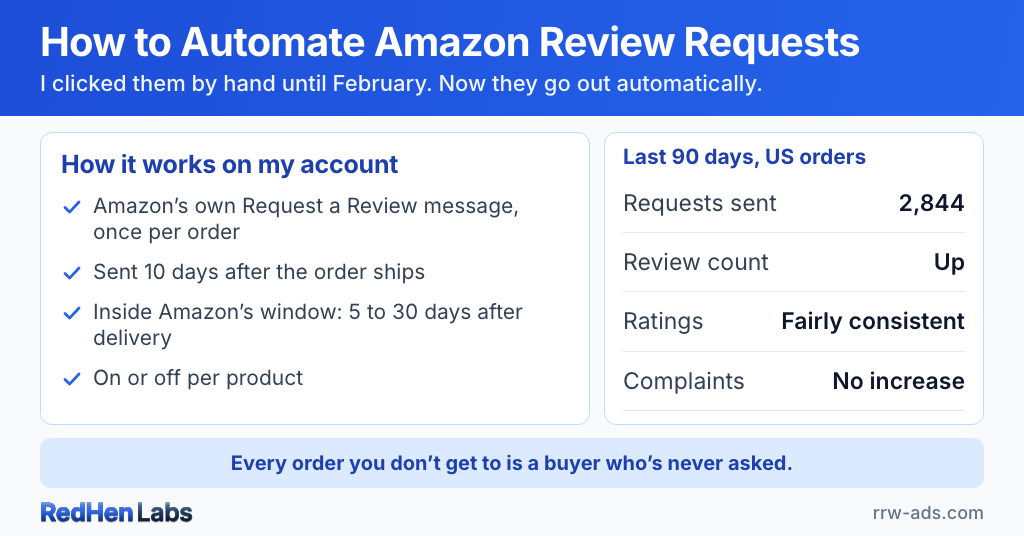
Since February 25 the request has gone out automatically on my account. In the last 90 days that was 2,844 requests on my US orders.
The short version
- Amazon's Request a Review button sends the buyer Amazon's own standard message asking for a product review and seller feedback, once per order, 5 to 30 days after delivery.
- I clicked it by hand until February 2026: a horrible, time-consuming job, and every order you miss is a buyer who's never asked.
- Software can send the same request through Amazon's Solicitations API; on my account it has gone out automatically since February 25, 2,844 times on US orders in the last 90 days.
- Timing is the hard part: my requests wait 10 days after each order ships, which allows for shipping and stays inside Amazon's window.
- Requests are on or off per product; since automating, my review count went up, the ratings stayed fairly consistent, and complaints didn't increase.
What Request a Review is
Every order in Seller Central has a Request a Review button. Press it and Amazon sends the buyer its own standard message asking for a product review and seller feedback, in the buyer’s language. You can’t change the wording or add anything to it, and because the message is Amazon’s, there’s nothing in it that can break the rules.
It has two limits: once per order, and only 5 to 30 days after the order is delivered.
Amazon offers the same action to software through its Solicitations API. A tool connected to your account sends exactly what the button sends, under the same limits. That’s why automating it is allowed. (Where the line is, and what gets accounts suspended.)
When the request goes out
Amazon counts its 5 to 30 days from delivery, not from the order, so timing is the hard part. Ask too early and Amazon refuses. My wait does two jobs: it stays inside Amazon’s window, and it allows for shipping.
On my account, RedHen Labs reads Amazon’s order notifications to see when each order ships, then waits the delay I’ve chosen (10, 14 or 21 days) before asking. A cancelled order is never asked.
Which products get asked
Requests are on or off per product, and I have two off. One is a soft paste wax I’ve discontinued. The other is an exterior oil I switched off at the end of August, and writing this, I realized it probably needs to be turned back on.
A switched-off product gives no sign. Its buyers just stop being asked, so check the list now and then.
What changed
My review count went up. The ratings stayed fairly consistent, and there was no increase in complaints or anything like that. Asking every buyer, not just the happy ones, didn’t bring more complaints.
Why I pair it with profit
More reviews lift conversion, but conversion on a product that loses money just loses money faster. Before you push for reviews on a product, know its real profit per product: what’s left after Amazon’s fees, product cost and ad spend.
That’s the $19 Review plan: Amazon’s own Request a Review on every eligible order, on the delay you choose, with per-product switches and real profit per product in the same dashboard. See how the Review plan works →
Frequently asked questions
Can you automate the Amazon Request a Review button?
Yes. Amazon offers the same action to software through its Solicitations API. A tool connected to your account sends the same standard message the button sends, once per order, 5 to 30 days after delivery. On my account it has run automatically since February 2026.
Why does an automated review request wait for the order to ship?
Because Amazon's 5–30 day window starts at delivery, not at the order, and a request sent too early is refused. Mine go out 10 days after each order ships, which allows for shipping and stays inside the window.
Should you turn off review requests for some products?
Only for a reason. I have two off: a wax I've discontinued, and an exterior oil I switched off in August that probably needs to be turned back on. A switched-off product gives no sign, so check the list now and then.
Does asking every buyer for a review bring more complaints?
Not on my account. Since I automated requests in February 2026, my review count went up, the ratings stayed fairly consistent, and complaints didn't increase. The request is Amazon's own neutral message, sent to every eligible buyer.
Related reading
Do it step by step in RedHen Labs
Ready to automate the right way?
RedHen Labs combines rules with AI — and keeps you in control.